Sequential usage
This notebook explains the basic usage of parafields. Everything that is explained here also holds true for the parallel case.
[1]:
import parafields
import numpy as np
The main entry point for the generation of Gaussian random fields is the generate_field function:
[2]:
field = parafields.generate_field(
    cells=(256, 256), extensions=(1.0, 1.0), covariance="exponential", variance=1.0
)
The cells parameter defines the resolution of the random field and can be a tuple of length 1, 2 or 3. The extensions parameter defines the size of the domain that the field is defined on. The covariance and variance define those stochastic properties of the field. The resulting variable field is of type parafields.RandomField and can easily be visualized in a Jupyter notebook:
[3]:
field
[3]:

In order to use the random field in your application, you can evaluate it on the entire domain, yielding a d-dimensional numpy array for further processing:
[4]:
values = field.evaluate()
[5]:
values
[5]:
array([[-0.0910003 ,  0.04465437, -0.18087368, ..., -1.26936908,
        -1.43790589, -1.12790016],
       [-0.42364449,  0.04926416, -0.6553278 , ..., -1.53616101,
        -1.42780289, -1.20881815],
       [-0.83540845, -0.27470769, -0.72884532, ..., -2.02817592,
        -1.35983913, -1.42528829],
       ...,
       [ 0.93061343,  0.89761665,  0.99479427, ...,  0.06016141,
        -0.02589693, -0.74266794],
       [ 0.19770374,  0.55807111,  0.57578741, ..., -0.02482266,
        -0.40573147, -0.38422701],
       [ 0.19221562,  1.06995701,  0.69222883, ...,  0.0844191 ,
        -0.32769239, -0.53310139]])
More stochastic properties
The generate_field function supports a lot more parameter that control stochastic properties of the field. For a full reference, you should see the Full API documentation. Here, we show some illustrative examples:
[6]:
parafields.generate_field(cells=(256, 256), covariance="cubic", variance=1.0)
[6]:

[7]:
parafields.generate_field(
    cells=(256, 256), covariance="cauchy", variance=0.5, corrLength=0.02
)
[7]:

[8]:
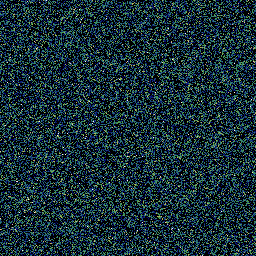
parafields.generate_field(cells=(256, 256), covariance="whiteNoise", variance=0.1)
[8]:
[9]:
parafields.generate_field(
    cells=(256, 256),
    covariance="gaussian",
    variance=0.1,
    corrLength=0.1,
    periodic=True,
)
[9]:

[10]:
parafields.generate_field(
    cells=(256, 256),
    covariance="exponential",
    variance=1.0,
    anisotropy="axiparallel",
    corrLength=[0.05, 0.2],
)
[10]:

Custom covariance functions
parafields also allows the definition of user-defined stochastic input in Python. These functions are then called directly from the C++ backend. In this example, we redefine the exponential covariance structure that is available with covariance="exponential":
[11]:
def exponential(variance, x):
    return variance * np.exp(-np.linalg.norm(x))
[12]:
parafields.generate_field(cells=(256, 256), covariance=exponential, variance=0.1)
[12]:

This is a very flexible tool for method development and rapid prototyping, but you should carefully look at the performance implications of this approach if using it in production (e.g. above example is slower by a factor of ~20).
Trend components
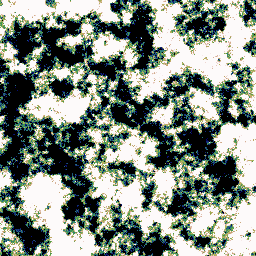
So far, we only generated the stochastic part of a random field. However, parafields can also generate a variety of trend components that use the same random number generator. These are added by calling the respective methods on the field object:
[13]:
field = parafields.generate_field(cells=(256, 256), covariance="exponential")
field.add_mean_trend_component(mean=0.5, variance=0.1)
[13]:
[14]:
field = parafields.generate_field(cells=(256, 256), covariance="exponential")
field.add_slope_trend_component(mean=[0.5, 0.2], variance=[0.1, 0.01])
[14]:

[15]:
field = parafields.generate_field(cells=(256, 256), covariance="exponential")
field.add_disk_trend_component(
    mean_position=[0.25, 0.25],
    variance_position=[0.1, 0.1],
    mean_radius=0.1,
    variance_radius=0.01,
    mean_height=3.0,
    variance_height=0.1,
)
[15]:

[16]:
field = parafields.generate_field(cells=(256, 256), covariance="exponential")
field.add_block_trend_component(
    mean_position=[0.25, 0.25],
    variance_position=[0.1, 0.1],
    mean_extent=[0.2, 0.2],
    variance_extent=[0.01, 0.01],
    mean_height=1.0,
    variance_height=0.1,
)
[16]:

Deterministic Field generation
The pseudo-random number generator that is used by parafields can be provided a seed. By default, the seed is parameter is None, which means that a new seed will be generated on each run. However, the seed can be explicitly set in order to allow deterministic field generation:
[17]:
field1 = parafields.generate_field(
    cells=(256, 256), covariance="exponential", variance=1.0, seed=42
)
[18]:
field2 = parafields.generate_field(
    cells=(256, 256), covariance="exponential", variance=1.0, seed=42
)
[19]:
np.allclose(field1.evaluate(), field2.evaluate())
[19]:
True
If you want to create new realization of a random field with another seed, you can also explicitly regenerate the field:
[20]:
field1.generate(seed=0)
Custom Random Number Generator
If you need full control of the RNG used by parafields, you can pass a callable to the rng parameter. The callable is expected to return a drawn sample for each call (without parameters). If the RNG is supposed to use a specific seed, you are responsible for setting the seed before passing. This example uses an RNG provided by numpy:
[21]:
gen = np.random.default_rng()
rng = lambda: gen.random()
[22]:
parafields.generate_field(cells=(256, 256), covariance="exponential", rng=rng)
[22]:

Tuning the embedding factor
Depending on your choice of covariance structure and correlation length, the circulant embedding procedure might fail due to negative eigen values. In such cases, increasing the embedding factor (and thereby also the computational cost) allows generating valid fields. If you intend to generate a lot of realizations for a set of stochastic parameters, it is worth to finetune this parameter to the minimal number that does still produce a valid result. parafields implements a search strategy
for this, which can be enabled by passing autotune_embedding_factor=True to field generation:
[23]:
field = parafields.generate_field(
    cells=(256, 256),
    extensions=(1.0, 1.0),
    covariance="gaussian",
    corrLength=0.5,
    autotune_embedding_factor=True,
)
negative eigenvalues in covariance matrix, consider increasing embeddingFactor, or alternatively allow generation of approximate samples
negative eigenvalues in covariance matrix, consider increasing embeddingFactor, or alternatively allow generation of approximate samples
negative eigenvalues in covariance matrix, consider increasing embeddingFactor, or alternatively allow generation of approximate samples
If you are interested in the actual embedding factor used for a certain field, you can access it through the embedding_factor property:
[24]:
field.embedding_factor
[24]:
6